TESTS GALORE

Posted on 29 October 2024 by admin

During the development of this blog, I was mindful of the edge cases that may be encountered throughout the site. Feeling that I was still learning many aspects of web development, I tended to manually invoke them when testing. However, at a certain point this workflow became inefficient and I took the time to pause and learn how to write and use tests with the Django test suite. I was already familiar with the Python unittest framework, but only really had surface-level testing knowledge. 

Consulting testing tutorials, the recommendation to split model, view, and form tests into separate files within a "/tests/" module made sense and I followed this structure. I began with some simple tests around edge cases which I was already familiar with, for example assuring that the post listing excluded posts with a publication date in the future:

def create_post(
    user, title="Test Post", content="This is test content.", pub_date=None
):
    if pub_date is None:
        pub_date = timezone.now()

    return Post.objects.create(
        title=title, content=content, pub_date=pub_date, user=user
    )


def create_future_and_recent_post(user):
    future_post = create_post(
        user=user,
        title="Future Post",
        content="This is a future post.",
        pub_date=timezone.now() + datetime.timedelta(days=1),
    )
    recent_post = create_post(
        user=user,
        title="Recent Post",
        content="This is a recent post.",
        pub_date=timezone.now() - datetime.timedelta(days=1),
    )

    return future_post, recent_post


class HomeViewTests(TestCase):
    def test_listing_excludes_future_posts(self):
        future_post, recent_post = create_future_and_recent_post(
            User.objects.create_user(username="test_user", password="12345")
        )
        response = self.client.get(reverse("blog:home"))

        self.assertQuerySetEqual(response.context["paginated_posts"], [recent_post])

After becoming more comfortable with testing, I added docstrings for clarity, used the setUpTestData class method for class-wide data setup and wrote more detailed tests, such as test_tree_post_list_order, which not only asserts that posts are correctly ordered in the back-end, but also in the front-end:

def create_post(
    user, title="Test Post", content="This is test content.", pub_date=None
):
    if pub_date is None:
        pub_date = timezone.now()

    return Post.objects.create(
        title=title, content=content, pub_date=pub_date, user=user
    )


def create_date_staggered_posts(user):
    recent_post = create_post(
        user=user, title="Recent Title", content="This is recent content."
    )
    old_post = create_post(
        user=user,
        title="Old Title",
        content="This is old content.",
        pub_date=timezone.now() - datetime.timedelta(days=1),
    )
    oldest_post = create_post(
        user=user,
        title="Oldest Title",
        content="This is the oldest content.",
        pub_date=timezone.now() - datetime.timedelta(days=2),
    )

    return recent_post, old_post, oldest_post


class HomeViewTests(TestCase):
    @classmethod
    def setUpTestData(cls):
        cls.user = User.objects.create_user(username="test_user", password="12345")
        cls.paginate_by = BlogHomeView.paginate_by
        cls.multi_post_count = (cls.paginate_by * 3) // 2  # For pagination tests

    def test_tree_post_list_order(self):
        """
        Verify the post tree object list is in descending order in the back-end
        and front-end.
        """
        recent_post, old_post, oldest_post = create_date_staggered_posts(user=self.user)
        response = self.client.get(reverse("blog:home"))
        response_content = response.content.decode()

        self.assertQuerySetEqual(
            response.context["tree_posts"], [recent_post, old_post, oldest_post]
        )

        # Compare indexes to check posts are rendered in the correct order
        self.assertTrue(
            response_content.index(f"{recent_post.title}")
            < response_content.index(f"{old_post.title}")
            < response_content.index(f"{oldest_post.title}")
        )

Writing tests actually brought to light things I had overlooked when manually testing, such as feedback to the user when the post listing is empty (I'd almost always used at least 1 post for layout testing):

def test_empty_post_listing(self):
    """
    Verify empty state message is shown in place of an empty post listing.
    """
    response = self.client.get(reverse("blog:home"))

    self.assertQuerySetEqual(response.context["paginated_posts"], [])
    self.assertContains(
        response, '<p class="empty-listing">No posts available.</p>'
    )

All in all, writing and using Django tests proved to be incredibly powerful and useful. They assisted me in speeding up my workflow, gave me peace of mind that existing functionality broken by new developments can be easily identified, and even highlighted missing features.

CUSTOMISING THE ADMIN SITE

Posted on 15 October 2024 by admin

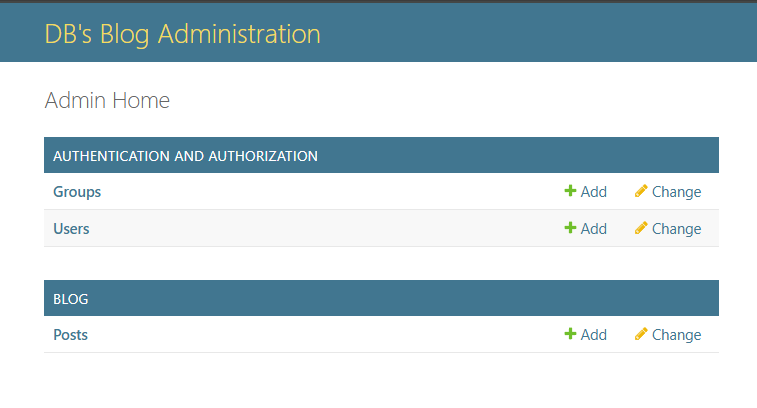
Having used the Django admin site extensively during development, I came to appreciate its functionality and intuitiveness.  However, I felt that it could do with a little personalisation.

Specifically, I wanted to customise the site header, title suffix, and index title, which by default are "Django Administration", "Django site admin", and "Site administration" respectively. I initially came across a method which involves subclassing admin.AdminSite and overriding the relevant attributes, like so:

from django.contrib import admin
from .models import Post


class CustomAdminSite(admin.AdminSite):
    site_header = "DB's Blog Administration"
    site_title = "Site Admin"
    index_title = "Admin Home"


class PostAdmin(admin.ModelAdmin):
    list_display = ["title", "pub_date", "user"]
    search_fields = ["title"]
    exclude = ["slug"]


custom_admin_site = CustomAdminSite()

custom_admin_site.register(Post, PostAdmin)

But after learning more about the AdminSite class, I realised that subclassing may not be necessary in my case, considering all I wanted was to modify some display text, not the functionality. The solution was to simply override the attributes of the default AdminSite object: 

from django.contrib import admin
from .models import Post


class PostAdmin(admin.ModelAdmin):
    list_display = ["title", "pub_date", "user"]
    search_fields = ["title"]
    exclude = ["slug"]


admin.site.register(Post, PostAdmin)

admin.site.site_header = "DB's Blog Administration"
admin.site.site_title = "Site Admin"
admin.site.index_title = "Admin Home"

This addition yields the following result:

SLUGS, GLORIOUS SLUGS

Posted on 05 October 2024 by admin

For a long while, I maintained a very simple URL path for blog posts in the form of "/post/<primary key>". However, after studying the URLs of other blogs and websites in general, I saw that this wasn't very conventional, clear, or optimal for SEO. I figured the title of the post should be incorporated in some way in place of the primary key, and that the "/post/" segment was redundant in the context of a blog. It would be clearer using the publication date instead.

The new URL path structure I settled on was "/<year>/<month>/<slug>". Whilst the year and month could be obtained from the publication date field attributes, I wanted the slug to be created automatically from the title rather than being set by the user. So, I overrode the save method for the model subclass and used the "slugify" Django utility on the post title:

def save(self, *args, **kwargs):
    self.slug = slugify(self.title)

    super().save(*args, **kwargs)

Almost immediately, the edge case occurred to me where two posts published in the same year and month could have the same title, and thus the same slug, causing a URL collision. Sure, I could have reverted back to a manually-set slug and applied a unique=True validator, but that seemed like taking the easy way out.

Instead, I added a while loop to the save method which would check for existing posts with the same publication year and month and slugified title. In the case of a conflict, the new post would have an incremented counter appended to its slug:

def save(self, *args, **kwargs):
    original_slug = slugify(self.title)
    unique_slug = original_slug
    counter = 1
    while Post.objects.filter(
        slug=unique_slug,
        pub_date__year=self.pub_date.year,
        pub_date__month=self.pub_date.month,
    ).exists():
        unique_slug = f"{original_slug}-{counter}"
        counter += 1
    self.slug = unique_slug

    super().save(*args, **kwargs)

This was all well and good until the time came to actually write, save, edit and re-save posts. When re-saving an existing post without modifying the title, the save method would match it against all 3 queryset filters, and it would be assigned a new, incremented slug. If re-saved again, the original slug would be available and assigned, and so on.

Having considered my options, I decided to constrain slug creation to new posts and posts with modified titles. Additionally, slug creation was moved to its own method for separation of concerns: 

def get_slug(self, title):
    original_slug = slugify(title)
    unique_slug = original_slug
    counter = 1
    while Post.objects.filter(
        slug=unique_slug,
        pub_date__year=self.pub_date.year,
        pub_date__month=self.pub_date.month,
    ).exists():
        unique_slug = f"{original_slug}-{counter}"
        counter += 1

    return unique_slug

def save(self, *args, **kwargs):
    if not self.pk or (
        self.pk and Post.objects.get(pk=self.pk).title != self.title
    ):
        self.slug = self.get_slug(self.title)

    super().save(*args, **kwargs)

The last, and perhaps most unlikely, edge case to consider was that the title may be non-empty, but cannot be slugified due to not having any alphanumeric characters. For instance, it could be a goofy title only made up of emojis.

In this case, the post will still need a highly-unique identifier, but also one that can be easily and automatically created, such as UUID (universally unique identifier). This is the final implementation:

def get_slug(self, title):
    original_slug = slugify(title)
    if not original_slug:
        return str(uuid.uuid4())

    unique_slug = original_slug
    counter = 1
    while Post.objects.filter(
        slug=unique_slug,
        pub_date__year=self.pub_date.year,
        pub_date__month=self.pub_date.month,
    ).exists():
        unique_slug = f"{original_slug}-{counter}"
        counter += 1

    return unique_slug

def save(self, *args, **kwargs):
    if not self.pk or (
        self.pk and Post.objects.get(pk=self.pk).title != self.title
    ):
        self.slug = self.get_slug(self.title)

    super().save(*args, **kwargs)

HAMBURGER MENU & DYNAMIC FILL

Posted on 26 September 2024 by admin

When refining the layout of the blog and testing it at different viewport sizes, I saw that at smaller sizes it was not feasible to include both the main body (post list) and the sidebar. What to do? Well, studying the layouts of other blogs, they often moved the sidebar functions into a menu at a certain breakpoint.

So, at below tablet viewport size, I did the same. The search and archive functions would be in a menu that was, for the most part, identical to the sidebar in design and functionality, and accessed by pressing a fixed floating hamburger menu button.

The issue was, between the banner image and the white background for the body below it, having the menu button be any one fixed colour wasn't ideal for contrast (at least in my opinion). To resolve this, I had the idea to implement a dynamic colour fill for the button, where it would be white against the banner image, and then transition to black as it crossed the banner/body boundary during scrolling. When the menu was open/active, the fill would be black irrespective of the boundary.

I looked for simple, built-in solutions and found that the mix-blend-mode CSS property set to difference could be the mechanism for this. Indeed, this property is capable of dynamic colour changes during scrolling, but it requires both the foreground and background to be monochrome to have the effect I had in mind. The banner image would cause unpredictable inverted colour fill.

For peace of mind and to completely implement my vision, I opted to use JavaScript instead. There would be a scroll event listener checking the overlap percentage of elements in the button relative to the banner/header, using an inline gradient style linear-gradient(white 100%, black 0%) as a starting point for the fill. The percentage of white fill decreased dynamically as the overlap decreased, and vice versa, with this style applying a discrete black/white split.

Admittedly, it was rather tricky to achieve the result as I had imagined it, but in the end also reassuring that it was possible and didn't have to resort to using mix-blend-mode and compromise the design to make it work. It was also good practice in using element metrics such as getBoundingClientRect() and exposure to as-yet-unfamiliar CSS properties such as border-image-source.

GENERIC VIEWS = BEST VIEWS?

Posted on 14 September 2024 by admin

For me, views in Django come to arguably be the trickiest aspect to try and master. Perhaps it was because they seemed like a bit of an abstract intermediary object, or because there are multiple approaches that require some familiarity to decide which suits the current application best.

The very first views I used were the standard, function-based type:

from django.core.paginator import Paginator, EmptyPage
from django.http import Http404
from django.shortcuts import render
from django.utils import timezone
from .forms import SearchForm
from .models import Post


def blog_home(request):
    posts = Post.objects.filter(pub_date__lte=timezone.now()).order_by("-pub_date")
    form = SearchForm()
    paginator = Paginator(posts, 5)
    page = request.GET.get("page")

    if not page:
        page = 1
    else:
        try:
            page = int(page)
        except ValueError:
            raise Http404()

    try:
        paginated_posts = paginator.page(page)
    except EmptyPage:
        raise Http404()
    return render(
        request,
        "blog/home.html",
        {"tree_posts": posts, "form": form, "paginated_posts": paginated_posts},
    )

As you can see, being the "messenger" between the model and template, views do take some setting up, depending on your requirements. In my case, the need for pagination of the post listing and the different scenarios that may occur with page requests need to be accommodated. Additionally, compiling the context variable dictionary for the render function is somewhat cumbersome, especially if the number of variables is large.

After learning more about views, I saw that they may alternatively be encapsulated in a class by subclassing the View parent class. I switched to this approach, as it seemed tidier and more modular:

from django.views import View


class BlogHomeView(View):
    def get(self, request):
        posts = Post.objects.filter(pub_date__lte=timezone.now()).order_by("-pub_date")
        form = SearchForm()
        paginator = Paginator(posts, 5)
        page = request.GET.get("page")

        if not page:
            page = 1
        else:
            try:
                page = int(page)
            except ValueError:
                raise Http404()

        try:
            paginated_posts = paginator.page(page)
        except EmptyPage:
            raise Http404()
        return render(
            request,
            "blog/home.html",
            {"tree_posts": posts, "form": form, "paginated_posts": paginated_posts},
        )

Later down the line, when looking for ways to potential simplify or refactor my views, I encountered "generic" class-based views. These can be thought of as "off-the-shelf" views geared towards specific use cases, such as listings with ListView, or a single item/article with DetailView, etc., with much of the setup abstracted away.

The relevant attributes can be overridden in a plug-and-play fashion. My application also necessitated overriding a couple of methods to tailor the object list filtering and for additional context variables. This particular generic view even has a built-in paginator, enabling pagination without worrying about the logic:

from django.views import generic


class BlogHomeView(generic.ListView):
    model = Post
    template_name = "blog/home.html"
    context_object_name = "paginated_posts"
    paginate_by = 5
    ordering = "-pub_date"

    def get_queryset(self):
        return Post.objects.filter(pub_date__lte=timezone.now()).order_by(self.ordering)

    def get_context_data(self, **kwargs):
        context = super().get_context_data(**kwargs)

        context["form"] = SearchForm()
        context["tree_posts"] = self.object_list

        return context

In conclusion, generic class-based views proved to be incredibly useful for compact, easy-to-read views. My requirements were covered by exclusively using either the ListView or DetailView.