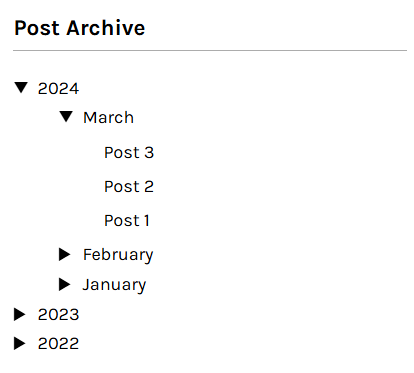
Browsing some blogs I've visited in the past for inspiration in what to include my blog sidebar, an interesting structure caught my eye. It was a collapsible directory tree for all posts in a blog, categorised primarily by year and then by month; a wonderfully simple idea, but intuitive and useful.
The first challenge was figuring out how to break down the post object list into the tree structure. Consulting the docs, I came across the {% regroup %} Django template tag. This handy tag enabled me to create new groups of posts by year, and then by month within each year in a pretty clear manner:
<ul class="years">
    {% regroup tree_posts by pub_date.year as year_list %}
    {% for year in year_list %}
        <li class="year reveal">
            {{ year.grouper }}
            <ul class ="months">
                {% regroup year.list by pub_date.month as month_list %}
                {% for month in month_list %}
                    <li class="month">
                        {{ month.list.0.pub_date|date:"F" }}
                        <ul class="dates">
                            {% for post in month.list %}
                                <li>
                                    <a href="{% url 'post_detail_view' post_id=post.post_id %}">
                                        {{ post.title }}
                                    </a>
                                </li>
                            {% endfor %}
                        </ul>
                    </li>
                {% endfor %}
            </ul>
        </li>
    {% endfor %}
</ul>
In this initial implementation, all years in the tree would be expanded by default; the months would remain collapsed to prevent clutter upon loading. Next up was applying interactivity using JavaScript. This involved adding a mouse click event listener to all year and month li elements that toggled a reveal class, and applied an inline style to their child ul element (if it existed) with a ternary operator:
const yearMonthElements = document.querySelectorAll(".year, .month");

yearMonthElements.forEach(function (element) {
    element.style.display = "block";
    element.addEventListener("click", function (event) {
        event.stopPropagation();
        element.classList.toggle("reveal");
        const childUl = element.querySelector("ul");

        if (childUl) {
            childUl.style.display = childUl.style.display === "none" ? "block" : "none";
        }
    })
});
Just to note, the line event.stopPropagation(); served an important purpose, as I had discovered mouse clicks on a nested list item, i.e. the month, "propagate" up the tree and cause the top-level list items, i.e. the year, to also be triggered. This line prevented that behaviour.
Then, to keep the month ul elements collapsed:
const datesElements = document.querySelectorAll(".dates");

datesElements.forEach(function (element) {
    element.style.display = "none";
})
Of course, this was the only the first version of the post tree HTML and logic. Eventually, I enhanced it with default inline styles to remove the unnecessary style assignments with JavaScript, data attributes for scripting use, and minor formatting changes. The JS logic was improved too, so that the tree by default only revealed the most recent year and month's posts.
<ul class="years">
    {% regroup tree_posts by pub_date.year as year_list %}
    {% for year in year_list %}
        <li class="year" data-year="{{ year.grouper }}">{{ year.grouper }}
            <ul class="months" style="display: none; opacity: 0;">
                {% regroup year.list by pub_date.month as month_list %}
                {% for month in month_list %}
                    <li class="month"
                        data-month="{{ month.list.0.pub_date|date:'m' }}">{{ month.list.0.pub_date|date:"F" }}
                        <ul class="dates" style="display: none; opacity: 0;">
                            {% for post in month.list %}
                                <li>
                                    <a href="{% url 'blog:post_detail' year=post.pub_date.year month=post.pub_date.month|stringformat:'02d' slug=post.slug %}"
                                        class="post-clamp">{{ post.title }}
                                    </a>
                                </li>
                            {% endfor %}
                        </ul>
                    </li>
                {% endfor %}
            </ul>
        </li>
    {% endfor %}
</ul>
Here is an illustrative example of the final version:
 After careful consideration, I made the call to substitute all images — not with clipart, but with illustrative geometric shapes. The shape colours would be representative of every image they replaced, and have similar drop shadow effects where applicable. As the original site used the